Friend Tracker: Find a Phone
- 4.4
- Rating
- 1.00M
- Installs
- Free
- Price

 Analysis by App-foxy
Keeping track of people you care about sounds simple until a busy day, a crowded place, or a weak sense of direction turns it into a real problem. I tried Friend Tracker: Find a Phone with that kind of everyday use in mind, and I found an app that focuses on location sharing rather than trying to become a full family organizer. It is a free lifestyle app from AppNations, built around finding a phone and viewing the real-time GPS position of kids, family members, or friends.
My first impression was that its purpose is easy to understand. You are not opening it for social posts, messaging, or a complicated travel dashboard. You are opening it because you want to know where a connected person or device is. That narrow purpose is its main strength, but it also means the quality of the experience depends heavily on how clearly everyone sets it up and agrees to use it.
How Friend Tracker feels to use in different situations
I find the app easiest to judge by the situation I want it to help with: a quick location check can reduce confusing calls, but it works best when everyone understands what the marker can and cannot tell them. In this section, I’ll look at how that focused approach feels across everyday contexts, then consider where it is genuinely useful and where another way of checking in may be kinder or simpler.
You May Also Like

 Blood Strike: 2.5 Anniversary
Blood Strike’s Loadouts Turn Every Drop Into a Tactical Gamble
A close look at Blood Strike’s custom loadouts: how fast access to signature weapons reshapes its battle royale rhythm, rewards preparation, and narrows the gap between fights.

 Pandora - Music & Podcasts
Pandora’s Music Is Easy to Start, but Harder to Recover
Pandora’s strength is its low-effort path from a seed to a station. Its weak spot is how much confidence it asks you to place in connection, setup, and quiet recovery.

 8 Ball Pool
 Is Built on Rivalries, Rematches, and Routine
A close look at the rivalries, rematches, shared routines, and unanswered safety questions that turn a quick pool match into a persistent mobile community.

 Samsung Music
’s Quiet Strength Is Playing What You Already Own
Its reach comes less from spectacle than from dependable access to a personal library. That simplicity is both the app’s strongest retention engine and its ceiling.

 AccuWeather: Weather Radar
AccuWeather Review: A Quick, Clear Forecast for Everyday Decisions
For everyday plans, the best forecast is the one you can understand quickly. AccuWeather makes rain timing, radar, and local conditions easy to act on, with a few trade-offs.

 Hill Climb Racing
Why Hill Climb Racing Still Turns Crashes Into One More Run
A tiny car, a bumpy hill and one more upgrade: Hill Climb Racing keeps resurfacing because its simple chaos makes every near-miss feel personal.
More From Our News Desk



Readability and navigation are strongest when the task is simple
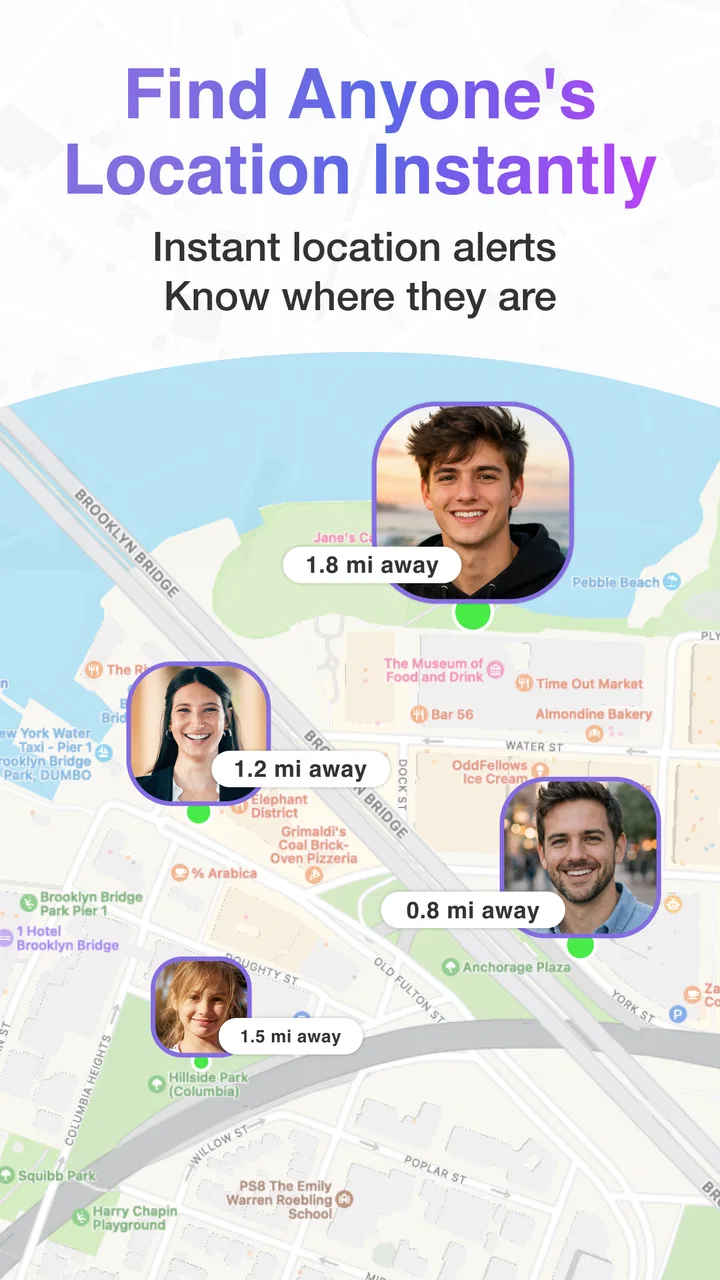
The app’s central idea is easier to grasp than many location tools that bury the map under calendars, chat threads, alerts, and account settings. When I think about using it, the most useful workflow is direct: open the app, identify the person or phone you need, and check the current location. That makes it approachable for someone who does not want to learn a large family-management system.
The short name “Friend Tracker” also communicates the general purpose quickly, while the longer product name makes the phone-finding function clearer. That distinction matters because people often search for a location app with a specific problem in mind: a child arriving home, a friend trying to meet at a festival, or a misplaced phone that still has a usable connection.
For readability, I would still avoid assuming that every user will find a map-based interface effortless. Maps contain labels, roads, markers, movement, and changing visual information. A person with low vision, reading fatigue, or difficulty distinguishing small interface elements may need to enlarge system text or use device accessibility settings. Those adjustments can help with surrounding controls, but they cannot make every map detail equally easy to interpret.
I also think the app is more comfortable for users who already understand the difference between a phone’s location and a person’s exact whereabouts. A marker can indicate where a device is, but that does not automatically explain whether its owner is inside a building, nearby in a large venue, or moving through an area with limited positioning accuracy. That is an important mental step, especially for older relatives or first-time location-sharing users.
One useful habit is to agree on a naming system before adding several people. Names such as “Mum,” “School pickup,” or “Blue phone” are easier to recognize at a glance than a list of nearly identical entries. This is a small practical improvement, but it reduces the chance of checking the wrong person when time matters.
Motor and sensory considerations require realistic expectations
A location tracker can be helpful for people who find phone calls difficult, because checking a position may require less conversation than coordinating by voice. It can also support someone who prefers visual information or needs extra time to respond to messages. In that sense, Friend Tracker can fit situations where a simple location check is less demanding than repeated calls or detailed directions.
However, I would not describe it as automatically accessible for every ability. A map can be challenging for users who cannot comfortably see small markers, interpret spatial layouts, or follow changing visual information. Someone with tremors or limited fine-motor control may also find map gestures and small controls tiring, depending on the phone and operating-system settings. The app benefits from the accessibility tools already available on Android or iOS, but the experience will vary with the device.
People with hearing loss may appreciate that the core task does not depend on hearing an alert or speaking to another user. At the same time, location alone is not a complete communication method. If a person is lost, in danger, or unable to move, the map does not replace a call, text, emergency service, or a trusted support plan. I would use the app as one layer of contact, not as the only way to confirm someone is safe.
There is also a sensory consideration that is easy to overlook: constant location checking can become stressful. For a parent, partner, or carer, the convenience of seeing a position may turn into repeated refreshing and worry when the marker does not change. I recommend deciding in advance what counts as a genuine concern. Without that boundary, a tool intended to provide reassurance can encourage unnecessary monitoring.
For children and teenagers, the conversation around consent and privacy is just as important as the technical setup. The app has a Teen content rating, but that does not decide whether it is suitable for a particular family. I would explain who can see the location, when it will be checked, and what happens if the phone is switched off or unavailable. Clear expectations make the feature more respectful and reduce confusion later.
Situational access is where the app makes the most sense
The best everyday scenario I can imagine is a family meeting at a large public place. One person is delayed, phone calls are hard to hear, and written directions become confusing. Instead of sending several messages describing entrances and landmarks, the group can use the location view to understand whether the person is still approaching or has reached the area. That does not solve every meeting problem, but it can remove a lot of back-and-forth.
It can also be useful for a child’s journey between familiar places, provided the family treats it as a check-in aid rather than a substitute for teaching road safety. A parent may want to see whether the phone has reached the expected destination, while the child may prefer not to answer repeated calls during the journey. The practical value comes from combining the app with a simple rule, such as contacting one another if the location remains unexpected for a reasonable period.
For friends, the app is more useful in temporary situations than as a permanent surveillance tool. At a concert, on a hike, or during a holiday in an unfamiliar city, sharing a location can help a group reunite. Once the event ends, I would review who still has access and remove arrangements that are no longer needed. That routine keeps a short-term convenience from becoming forgotten, ongoing tracking.
People who misplace a phone may also find the concept appealing. The phrase “find a phone” suggests a practical recovery use, but the result depends on the phone remaining usable for location information. If it has no power, no connection, or is somewhere that blocks positioning, an app cannot make the device reveal a reliable position. I would never leave essential belongings or personal safety dependent on this single method.
Compared with ordinary phone calls, Friend Tracker is quieter and more visual. Compared with sending a pin through a messaging app, it is more focused on checking a person or phone rather than composing a new message each time. Compared with broader family-safety platforms, it may feel less overwhelming because the purpose is narrower. The trade-off is that users looking for calendars, detailed routines, extensive communication tools, or a complete household dashboard may prefer a different category of app.
Setup choices affect privacy, trust, and usefulness
The most important non-obvious lesson is that location tracking is a relationship feature before it is a map feature. Everyone involved needs to understand the arrangement. If one person thinks the app is for occasional meetups while another expects constant visibility, the technology will create tension even if it works perfectly.
I would start with the smallest group possible and test one ordinary situation. For example, two friends could use it while meeting at a busy station, or a parent and teenager could try it during a planned trip. That trial reveals whether the map is understandable, whether the right person is easy to identify, and whether the process feels reassuring or intrusive. It is better than adding an entire family before anyone knows how the workflow feels.
A second useful practice is to compare the map with reality the first few times. If the marker appears several streets away from the actual location, do not immediately assume someone is in trouble. Buildings, crowded areas, weak signals, and the phone’s own positioning limits can affect what you see. Treat the display as an indication that needs context, not as a perfect live camera.
There is also a cost decision to make. The app is free to install, while its in-app purchases range from around eleven dollars to around sixty dollars per item. I would use the free experience long enough to decide whether the basic workflow genuinely helps before paying for anything. A purchase is only worthwhile if it solves a specific need you have identified, not simply because the idea of extra tracking sounds reassuring.
Because the app is aimed at friends and family, account ownership and device sharing deserve attention. I would avoid signing in on a phone that other people regularly use, and I would check the visible names before sharing access. These are ordinary privacy precautions, but they matter more when a location tool is involved. A mistaken contact or shared screen can expose more information than intended.
Remaining barriers that may change the decision
The biggest limitation is that location tracking is never independent of the phone. Battery condition, connectivity, device settings, and the surrounding environment can all affect the usefulness of the displayed position. Even when the app is functioning normally, a user may interpret a delayed or imprecise marker as an exact answer. That gap between what the screen appears to promise and what location technology can actually provide is worth explaining to every user.
Another barrier is social rather than technical. A child, friend, or partner may not want to be tracked continuously, and pressure to share a location can damage trust. I would skip this app for any arrangement where consent is unclear or where one person is expected to justify every movement. A location tool should support agreed safety routines, not become a way to control someone.
The Teen rating also means families should make their own judgement about maturity and privacy. Younger users may need an adult to explain what the app does and when it should be used. Older users may still need help with setup, map interpretation, or deciding what to do when the displayed position seems wrong. The rating is not a substitute for that conversation.
People who need highly detailed accessibility support should test the app on their own device before building an important routine around it. Enlarged text, screen readers, voice control, contrast settings, and alternative input methods can improve general phone use, but a map-based experience may remain difficult in some cases. If a user depends on spoken turn-by-turn guidance, text-based check-ins, or a non-visual interface, a different tool may fit better.
I would also skip it if the real need is emergency response. Friend Tracker can help someone understand a location, but it should not be treated as a replacement for emergency services or a formal care system. Likewise, a person who only wants to share a single destination once may find a normal messaging app faster and simpler. This app earns its place when location checking is a recurring, agreed part of staying connected.
Who should use it, and who should look elsewhere?
I can recommend it to families that want a focused way to check a relative’s or child’s phone, friends who regularly meet in crowded places, and users who prefer a visual location view over repeated calls. It is especially appealing if a full-featured family platform feels excessive. The free entry point makes it reasonable to test without committing money immediately.
I would be more cautious for people who expect perfect precision, automatic safety decisions, or a complete communication system. It is also not my first choice for someone who struggles with maps and does not have another person available to help with setup. A simpler check-in routine by text may be more dependable for that user, particularly when the goal is only to confirm arrival.
AppNations has kept the product’s identity clear: this is a lifestyle app centered on finding a phone and following the location of people who have agreed to be included. Its current version is 2.9.2, and it works on Android 7.0 and later. The app has passed one million installs, with an average rating of 4.4 from around 3.9 thousand ratings and 445 written reviews, which suggests that many users find the basic idea useful while still leaving room for individual experiences to differ.
My inclusive verdict after weighing the trade-offs
Friend Tracker: Find a Phone is most valuable when it is used as a clear, agreed check-in tool rather than an invisible monitoring system. I like its focused purpose, its relevance to ordinary family and friendship situations, and the way a visual location can reduce complicated directions. The app can make crowded meetups and planned journeys easier to coordinate, particularly for people who find repeated calls tiring or impractical.
Its inclusive value has limits. Map reading, small interface elements, uncertain positioning, and dependence on the phone itself can create barriers for users with visual, motor, cognitive, or situational needs. Accessibility settings may help, but I would test the complete workflow with the actual person who will use it. The right question is not whether the app sounds simple, but whether that person can identify the correct contact, understand the location display, and know what to do when the result is unclear.
My recommendation is to begin with one trusted contact, one realistic use case, and explicit privacy expectations. Keep a backup method for communication, treat the position as an aid rather than proof, and review access when a temporary arrangement ends. Used that way, the free app is worth trying for families and friends who want straightforward location sharing. If you need emergency-grade reliability, advanced accessibility support, or a broader household-management system, I would choose a more specialized alternative instead.
FAQs for Friend Tracker: Find a Phone
01What is Friend Tracker: Find a Phone and how does it work?
Friend Tracker: Find a Phone is designed to help users share and view the real-time or recent location of trusted friends and family members. After installation, participants generally need to create or join a group and grant location permissions. The app depends on GPS, mobile data, and the other person’s consent, so it cannot locate someone who has not accepted the request or enabled location sharing.
02Is Friend Tracker: Find a Phone free to download and use?
The application may be available to download at no initial cost, but some features can depend on advertising, in-app purchases, or a premium subscription. Before installing, check the current Google Play Store or App Store listing for pricing, trial conditions, and available plans. Pay particular attention to recurring subscription terms, because deleting the app does not automatically cancel an active subscription.
03Does the app require permission to access my location?
Yes, location access is essential for a phone-tracking application to function. Depending on the features you use, Friend Tracker: Find a Phone may request permission to access location while the app is open or in the background. You should review these settings carefully and choose the least extensive option that meets your needs. You can change permissions later through your device’s privacy settings.
04Can I track a friend’s phone without their knowledge or permission?
No. Responsible location-sharing services require the person being tracked to approve the request or actively join a shared group. The app should not be used to monitor another person secretly, and attempting to bypass consent can violate privacy expectations, app policies, or local law. Use it only with people who clearly understand what information is being shared and why.
05What should I know about accuracy, battery use, and privacy?
Location results are useful but not always exact. Accuracy can be affected by weak GPS signals, indoor environments, poor mobile coverage, disabled background activity, or battery-saving settings. Continuous location sharing may also increase battery and data usage. Before relying on the app for safety, review its privacy policy, limit sharing to trusted contacts, and remember that it should complement—not replace—emergency services.
Pros
- Simple interface makes location sharing easy to start.
- Useful for coordinating meetups with family or friends.
- Location updates can help confirm someone arrived safely.
- Works well for occasional check-ins during trips or outings.
- Clear map view makes shared locations easy to understand.
Cons
- Requires ongoing location access
- which may affect battery life.
- Accuracy can vary indoors or in areas with weak GPS signals.
- All participants must install the app and approve location sharing.
- Privacy depends on trusting contacts with your real-time location.
- Some features may require subscriptions or in-app purchases.

Friend Tracker: Find a Phone
Gallery